IconSwapper Brings Live Mac AI Usage to Desktop App Icons in Real Time
Discover IconSwapper, the innovative Mac application that tracks live AI usage and brings your desktop app icons to life with real-time dynamic data.

Varta Brief Team
Thursday, November 19, 2026
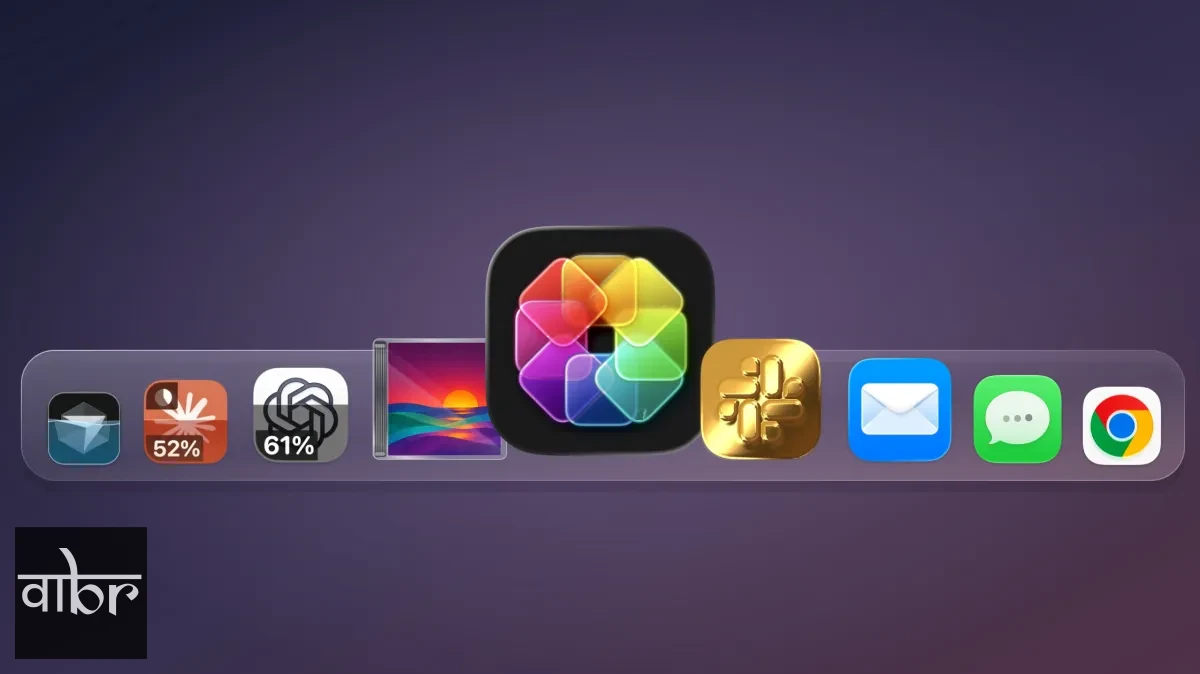
- Discover IconSwapper, the innovative Mac application that tracks live AI usage and brings your desktop app icons to life with real-time dynamic data.
- The personal computer desktop has remained largely static for decades. Even as operating systems evolved with stunning visual interfaces, dark modes, and modular widgets, the found...
The personal computer desktop has remained largely static for decades. Even as operating systems evolved with stunning visual interfaces, dark modes, and modular widgets, the foundational grid of application icons stayed anchored in the past: static PNG files sitting passively in the macOS Dock or scattered across the desktop grid. Today, a brilliant new utility called IconSwapper is redefining that paradigm entirely. By bridging the gap between deep system telemetry and graphic design, IconSwapper transforms standard desktop icons into breathing, animated dashboards that display live Mac AI usage right before your eyes.
As artificial intelligence becomes deeply integrated into everyday workflows through local models and cloud-based assistants, tracking resource consumption has become a challenge for power users. IconSwapper solves this by tying system metrics directly to visual elements. If you have ever wondered how much power your machine is dedicating to large language models or background processing, IconSwapper makes live Mac AI usage impossible to ignore, turning abstract data into striking visual feedback.
Deep Dive: Full Event Breakdown
The genesis of IconSwapper stems from a growing frustration among developers and power users who wanted a more intuitive way to monitor system performance without constantly opening Activity Monitor or dedicated menu bar dropdowns. IconSwapper introduces a seamless overlay and replacement engine that injects live data feeds directly into the dock icons of your favorite applications.
When you configure IconSwapper, the utility taps into macOS accessibility and performance APIs. For applications heavily reliant on artificial intelligence—such as local LLM runners, coding assistants, and creative suites leveraging neural engines—IconSwapper dynamically swaps out the static image file for a rendered vector or animated canvas. This allows IconSwapper to display token generation speeds, memory pressure, and overall live Mac AI usage directly on the icon itself.
The customization options inside IconSwapper are robust. Users can choose between minimalist badges, pulsing glowing borders, or full-blown mini-charts that reflect live Mac AI usage over a sliding time window. This level of granularity ensures that IconSwapper is not just a gimmick, but a genuinely useful tool for professionals managing heavy computational loads on modern Apple Silicon hardware.
Industry Impact & Strategic Implications
For years, Apple has refined macOS desktop customization through features like interactive widgets and Stacks. However, the macOS Dock has stubbornly preserved its traditional aesthetic. IconSwapper challenges this convention, signaling a shift in how utility software interacts with core operating system UI elements.
By focusing heavily on live Mac AI usage, IconSwapper taps into the zeitgeist of the current tech landscape. As artificial intelligence dominates hardware discussions, utility software must adapt to provide immediate, glanceable insights. Industry analysts note that IconSwapper could inspire Apple itself to rethink how icons behave in future iterations of macOS. When developers create clever workarounds to surface live Mac AI usage, platform holders often take notice, eventually rolling third-party innovations into native operating system features.
Furthermore, the success of IconSwapper highlights a broader trend in macOS desktop customization. Users no longer want static environments; they demand reactive workspaces that mirror their active workloads. IconSwapper proves that even small interface elements can be supercharged with real-time data without sacrificing system performance.
Technical / Market Analysis
Under the hood, IconSwapper is an engineering marvel. Rendering dynamic animations on active dock icons traditionally incurs a heavy CPU and battery penalty. However, IconSwapper leverages Apple Metal and optimized CoreAnimation frameworks to ensure that tracking live Mac AI usage does not degrade overall system performance or drain laptop batteries prematurely.
The market reception for IconSwapper has been overwhelmingly positive across developer communities and tech forums. As artificial intelligence tools proliferate, developers need efficient ways to monitor resource allocation. IconSwapper provides an elegant solution that bridges performance monitoring and aesthetic personalization. By democratizing access to live Mac AI usage metrics through an engaging interface, IconSwapper has carved out a unique niche in the crowded macOS utility software market.
Competitors in the productivity enhancement space are already taking notes. While traditional system monitors focus on text-heavy charts, IconSwapper prioritizes visual immediacy. This design philosophy is expected to influence the next wave of developer tools and desktop utilities designed for modern operating systems.
What This Means for Consumers and Developers
For everyday consumers, IconSwapper makes advanced system monitoring fun and accessible. You do not need a degree in computer science to understand a glowing, pulsing icon that indicates heavy processing. By visualizing live Mac AI usage, the app demystifies what is happening beneath the hood of your computer.
For software developers, IconSwapper represents a masterclass in UX design. It demonstrates how to take complex telemetry data and present it in a way that delights users. Developers working on artificial intelligence applications can look to IconSwapper as inspiration for how their own software should communicate state and performance to the end user.
Key Takeaways
IconSwapper revolutionizes macOS desktop customization by bringing dynamic, animated elements to standard application icons. The app tracks and displays live Mac AI usage, making it indispensable for users running local models and heavy computational tasks. Built with Apple Silicon optimization in mind, IconSwapper runs efficiently without draining battery life or impacting system speed. The software offers extensive customization, allowing users to choose between minimalist badges, glowing borders, and live graphical charts. IconSwapper bridges the gap between technical system telemetry and engaging graphic design.
The Road Ahead
The launch of IconSwapper marks only the beginning of a larger evolution in desktop interfaces. As artificial intelligence continues to permeate every aspect of modern computing, tools that visualize live Mac AI usage will become increasingly vital. Whether IconSwapper remains a beloved third-party utility or paves the way for native macOS features, it has fundamentally changed how we perceive and interact with our desktop app icons.
Strategic Industry Takeaways & Future Outlook
Furthermore, strategic integration surrounding live Mac AI usage remains a crucial priority for stakeholders. Ensuring high performance across live Mac AI usage is expected to deliver long-term competitive advantages.
Furthermore, strategic integration surrounding live Mac AI usage remains a crucial priority for stakeholders. Ensuring high performance across live Mac AI usage is expected to deliver long-term competitive advantages.
Key factors influencing this sector also include real-time app icons , artificial intelligence metrics , dynamic desktop widgets , macOS application , each playing an essential role in ongoing development and implementation.
📌 Related Briefings & Stories
AI agent tech outages are giving Y2K vibes: What went wrong? Meta Muse Charm Device Launch: Pricing and Specs Breakdown Inside the Game Greenlighting Process: How Free Lives Beat the Data
Varta Brief Team
· Newsroom DeskReported, verified, and published by the Varta Brief editorial desk with an uncompromising commitment to primary-source verification and independent journalism.
Related Dispatches
More in Technology →
Amazon Decart Acquisition Signals Bold Move to Challenge Nvidia AI Dominance
Amazon buys Decart for $7.5B to optimize Trainium silicon and reshuffle the Nvidia AI chip race across enterprise cloud computing infrastructure.
Nvidia Board Governance Tested as Jensen Huang Discloses Additional Affairs
A detailed investigation into how revelations around Jensen Huang leadership impact corporate stability, chip markets, and Nvidia's standing with investors.

GTA 6 Sets Historic Record as the Biggest Launch in PlayStation History
Discover how GTA 6 became the biggest launch in PlayStation history, shattering records and reshaping the modern gaming landscape with unprecedented sales.