
Apple Launches Enhanced Child Safety Tools Across 2026 Updates

Apple Launches Enhanced Child Safety Tools Across 2026 Software Updates
Apple has officially rolled out a comprehensive suite of upgraded child safety tools designed to provide parents with greater control over their children's digital experiences. The new tools arrive alongside the general availability of software updates for iOS 27, iPadOS 27, and macOS 27. Building on features first previewed at Apple's summer developer conference, these enhancements reflect a growing emphasis across the technology sector on youth digital well-being.
These safety enhancements are integrated into Apple’s existing ecosystem of parental controls. They offer granular controls over web access, real-time media filtering during communication, streamlined setup procedures, and evidence-based guidance for daily app usage.
With these updates, Apple aims to simplify digital parenting while maintaining robust privacy protections. The release follows recent cross-platform developments, as highlighted in Apple Releases Major 2026 Software Updates Across Platforms.
Key Takeaways of the 2026 Child Safety Release
- Simplified Onboarding: A newly redesigned account setup process recommends essential, age-appropriate apps for new child accounts.
- Ask to Browse: Parents must now approve requests before children access new websites in Safari.
- Expanded Image & Video Moderation: Communication Safety now detects and blocks graphic violence and gore in addition to explicit nudity across shared media and live FaceTime calls.
- Time Allowances: Includes tailored app time management guidelines developed in collaboration with leading digital health experts.
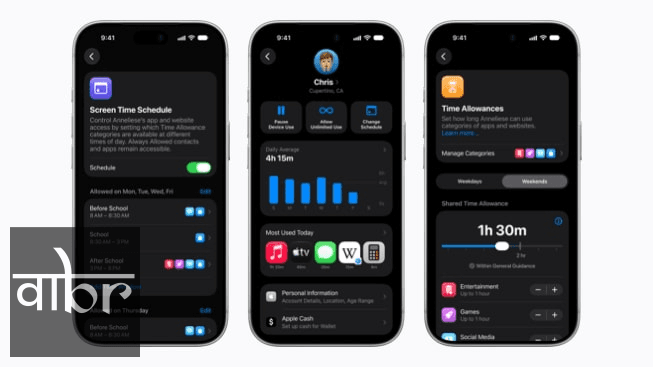
- Redesigned Screen Time Dashboard: Provides real-time usage monitoring and single-tap controls to modify access instantly.
- Expert Partnerships: Apple is collaborating with the American Academy of Pediatrics to adapt its Family Media Plan directly into product onboarding guides.
Core Features: Web Controls, Moderation, and Screen Time
Apple's updated child safety ecosystem focuses on three key pillars: content filtering, communication protection, and usage balance. The update addresses long-standing requests from parents for more responsive controls without compromising user privacy.
1. Ask to Browse and Onboarding Simplification
Setting up new devices for young users often presents setup friction. The updated operating systems streamline child account setup by suggesting a vetted collection of baseline application packages based on the child's age bracket.
Additionally, the Ask to Browse feature transforms default web access. When enabled, a child attempting to visit an unrecognized URL in Safari triggers an automated permission request sent directly to the parent's device, preventing unrestricted browsing without administrative consent.
2. Communication Safety Expansion
Apple’s Communication Safety framework, which originally used on-device machine learning to analyze incoming and outgoing images for nudity, now covers additional visual risks. The feature now detects visual depictions of gore and graphic violence across Messages, AirDrop, Photos pickers, and live FaceTime streams.
Because processing occurs entirely on-device, content contents remain end-to-end encrypted, ensuring that neither Apple nor third parties can view private communications.
3. Screen Time Redesign and Time Allowances
The refreshed Screen Time interface features a centralized dashboard that displays real-time activity metrics. Parents can grant temporary extensions or temporarily lock specific application categories with a single tap.
Complementing the interface updates is Time Allowances, a feature providing baseline parameters for daily usage across app categories such as Social Media, Games, and Entertainment. These guidelines are calibrated based on clinical research into child development, aligning with broader consumer adoption of Top Tech Trends to Watch in 2026.
Hardware Compatibility and Technical Specifications
To ensure uniform safety enforcement, Apple requires all devices linked within a Family Sharing group to run matching operating system generations. Below is a breakdown of feature availability and system requirements across the ecosystem:
Operating System | Minimum Required Version | Key Supported Features |
|---|---|---|
iOS | iOS 27 | Full Suite (Ask to Browse, Live FaceTime Filtering, Time Allowances) |
iPadOS | iPadOS 27 | Full Suite (Multi-window Screen Time, Web Filtering) |
macOS | macOS 27 | System-level Safari Filtering, Screen Time Controls |
watchOS | watchOS 27 | Communication Safety Warnings, Screen Time Sync |
visionOS | visionOS 27 | Spatial Media Protection, Communication Safety |
"Providing family-first digital guardrails requires balancing child protection with user autonomy. By embedding pediatric guidance directly into operating systems, platform tools can encourage healthy digital habits early in development." — Online Safety & Child Health Advisory Board
Industry Context and Global Availability
The rollout of these tools reflects broader regulatory and societal scrutiny regarding youth safety on modern technology platforms. By expanding on-device filtering capabilities, Apple addresses parental concerns while maintaining its core commitment to user privacy.
All features are currently available as part of the standard software updates released on September 14, 2026. Certain capabilities, including real-time language analysis and local expert guides, may vary depending on region, hardware model, and localization settings. Parents can access step-by-step setup documentation via Apple's updated online family resource portal.
Jitendra Jain
• Newsroom StaffDedicated to objective, deep, and fact-verified reporting across technology, science, world affairs, and modern markets.
Follow Varta Brief on Google
Add Varta Brief as a preferred source to see our verified stories and daily briefings in Google Top Stories and Discover.
Found this briefing insightful?
Share it with your colleagues and community.
